

Design and Construction
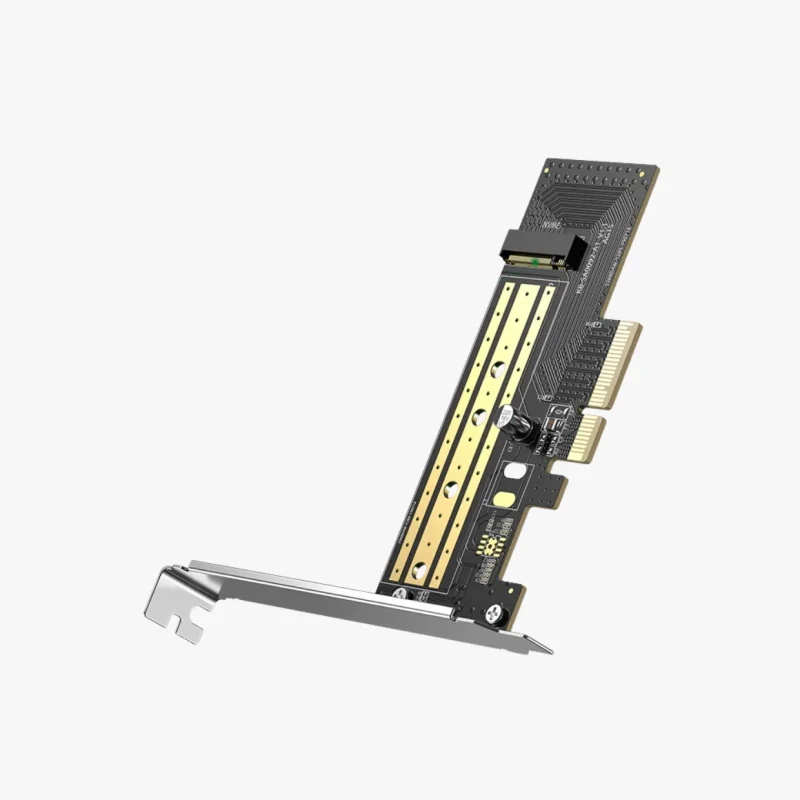
The expansion card features a compact PCIe add-in card design that fits into a standard PCIe ×4, ×8, or ×16 slot on a desktop motherboard.
It includes an M.2 socket that supports various SSD lengths, typically 2230, 2242, 2260, and 2280 form factors. The card is built with durable components and often includes a heat dissipation solution such as an aluminum heatsink or thermal pad to help maintain optimal SSD temperatures during heavy workloads.
The simple design allows users to install an NVMe SSD directly onto the card and secure it using the provided mounting hardware.

Compatibility
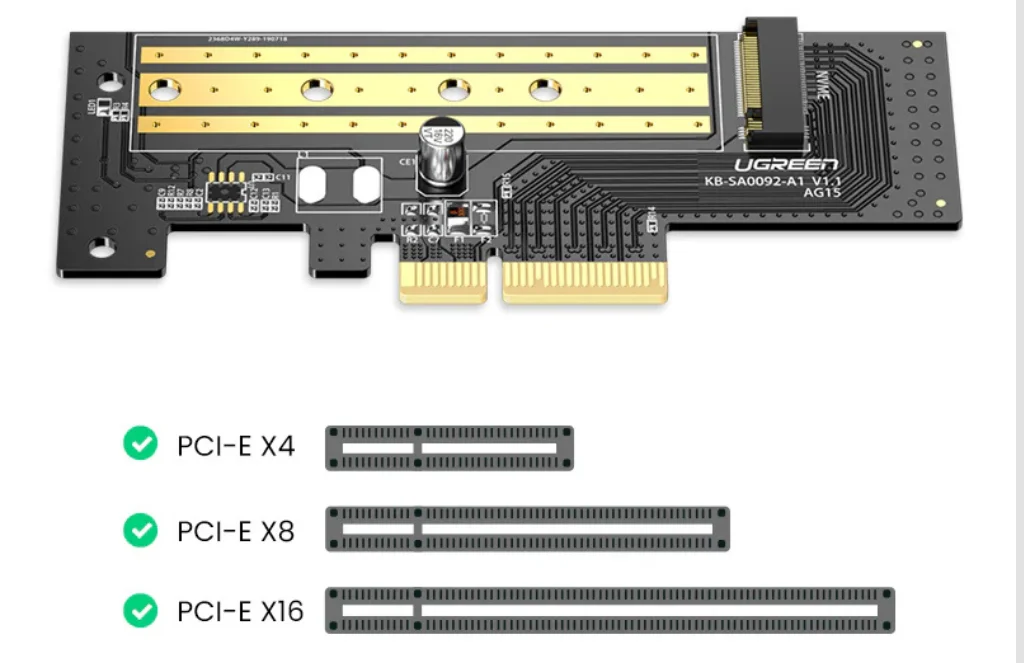
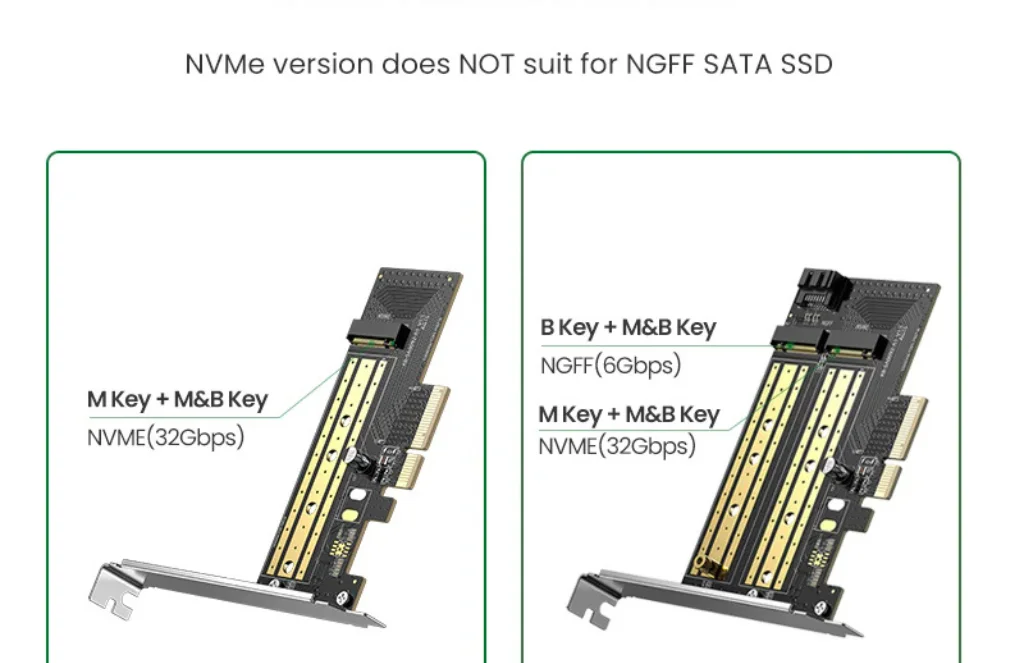
The UGREEN M.2 NVMe to PCI-E 3.0 ×4 Expansion Card is compatible with a wide range of desktop motherboards that feature available PCIe slots. It supports PCIe ×4, ×8, and ×16 slots, providing flexibility for different system configurations.
The adapter is designed specifically for M.2 NVMe SSDs that use the PCIe protocol. Most models do not support M.2 SATA SSDs, making it important for users to verify the type of SSD before installation.
The card is generally compatible with modern operating systems such as Windows and Linux, which include native NVMe driver support.
Thermal Management
NVMe SSDs can generate significant heat during sustained data transfers and intensive workloads. To address this issue, many UGREEN expansion cards include thermal management features such as:
Aluminum Heatsink
Helps dissipate heat from the SSD and maintain stable operating temperatures.

Compatibility
The card works with most Windows and Linux systems. However, boot support depends on whether the motherboard BIOS allows NVMe booting. It also fits a wide range of desktop cases due to its flexible slot compatibility and included mounting brackets.
Installation and Design
Installation is straightforward. First, the NVMe SSD is attached to the card. Next, the card is inserted into a PCIe slot on the motherboard. Finally, the heatsink helps maintain stable temperatures during operation.
The design also supports both full-height and low-profile brackets, making it suitable for different PC builds.
UGREEN M.2 NVMe to PCI-E 3.0 ×4 Expansion Card
The UGREEN M.2 NVMe to PCI-E 3.0 ×4 Expansion Card is a hardware adapter designed to connect an M.2 NVMe solid-state drive (SSD) to a desktop computer through a PCI Express (PCIe) slot. It provides an easy and cost-effective way to add high-speed NVMe storage to systems that either lack an M.2 slot or require additional storage capacity. By leveraging the PCIe 3.0 ×4 interface, the expansion card enables users to experience the full performance potential of modern NVMe SSDs, making it suitable for gaming, content creation, data-intensive applications, and general system upgrades.
Thermal Management
NVMe SSDs can generate significant heat during sustained data transfers and intensive workloads. To address this issue, many UGREEN expansion cards include thermal management features such as:
Aluminum Heatsink
Helps dissipate heat from the SSD and maintain stable operating temperatures.
Thermal Pads
Improve heat transfer between the SSD and the heatsink for more efficient cooling.
Enhanced Stability
By reducing thermal throttling, the cooling solution helps maintain consistent SSD performance during prolonged use.
These features contribute to improved reliability and longevity of the installed SSD.
Installation Process
The installation process is straightforward and user-friendly:
- Attach the NVMe SSD to the M.2 slot on the expansion card.
- Secure the SSD using the provided screw.
- Install the heatsink and thermal pad if included.
- Insert the expansion card into an available PCIe slot.
- Power on the system and verify drive detection in the BIOS or operating system.
Most operating systems automatically recognize the NVMe SSD without requiring additional drivers.
Common Applications
Storage Expansion
Users can add extra high-speed storage without replacing existing drives.
System Upgrades
Older desktop computers can gain NVMe SSD support even if they lack built-in M.2 slots.
Gaming
Faster storage speeds reduce game loading times and improve overall gaming performance.
Content Creation
Video editing, graphic design, and 3D rendering workflows benefit from faster file access and data transfer rates.
Data Management
Professionals handling large datasets can improve productivity through high-performance storage solutions.
Advantages
The UGREEN M.2 NVMe to PCI-E 3.0 ×4 Expansion Card offers several benefits:
- Supports high-speed NVMe SSDs.
- Utilizes PCIe 3.0 ×4 bandwidth for excellent performance.
- Compatible with multiple M.2 SSD sizes.
- Easy installation process.
- Cost-effective storage upgrade solution.
- Improves system responsiveness and productivity.
- Includes thermal management features for stable operation.
- Compatible with a wide range of desktop motherboards.
FAQs
It allows users to install an M.2 NVMe SSD into a desktop computer through a PCIe slot, enabling high-speed storage expansion.
No. Most versions are designed specifically for NVMe SSDs and do not support SATA-based M.2 drives.
The card typically supports M.2 SSD sizes 2230, 2242, 2260, and 2280
While not mandatory, a heatsink helps reduce SSD temperatures, prevent thermal throttling, and maintain consistent performance.
Yes, provided that your motherboard’s BIOS/UEFI supports booting from NVMe drives installed through a PCIe expansion card.





Reviews
There are no reviews yet.